
If you have received a key from Varjo or a reseller for claiming a license for your organization, you can claim the license in Varjo Account Portal.
Before claiming a license, make sure you have the following:
- A Varjo Account: You must be signed in to a Varjo Account.
- A Varjo Organization: Your account must belong to a Varjo organization. If you don't have one yet, you will need to create one before proceeding.
- Admin role: You must be an Admin of the organization you are claiming the license for.
To claim a license:
- Log in to Varjo Account Portal.
- Navigate to My organization.
- Select your organization.
- Navigate to Claim licenses.
- Select Claim.
- Enter your key.
- Select Claim.
Key format
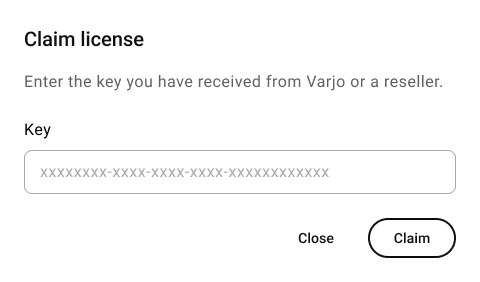
Make sure the key is entered in the format shown above. If you are copying the key from another source, check that no extra spaces are included.
Possible errors
|
Invalid key format. Please check the key and try again. If the problem persists, contact Varjo Support. |
The license key you entered is in an invalid format. Please check that you have not included any extra spaces or incorrect characters, and try again. Please check that the key was entered correctly and try again. If the problem persists, contact Varjo Support. |
|
License not found. Please check the key and try again. If the problem persists, contact Varjo Support. |
The license key you entered is in a valid format but could not be recognized by the system. Please check that the key was entered correctly and try again. If the problem persists, contact Varjo Support. |
|
License already claimed. Contact Varjo Support if your organization has not received the license. |
The license connected to this key has already been claimed. Please check that it has not already been registered to your organization. If the problem persists, contact Varjo Support. |
|
License claim failed. A ticket has been created and Varjo will reach out in 1 business day. |
The license claim failed due to a system error. We will investigate the issue and get back to you within 1 business day. |
Creating a ticket through the Varjo support form
- Go to the Varjo support form.
- Under ‘What can we help you with?’, choose Varjo services.
- Under ‘Product or service’, select Account Portal Claim.
- In the Subject field, enter: Failed license claim
- In the Description field, include the following:
- The license key you received
- Your organization name
- Your organization ID
- Fill in your details.
- Select Submit.